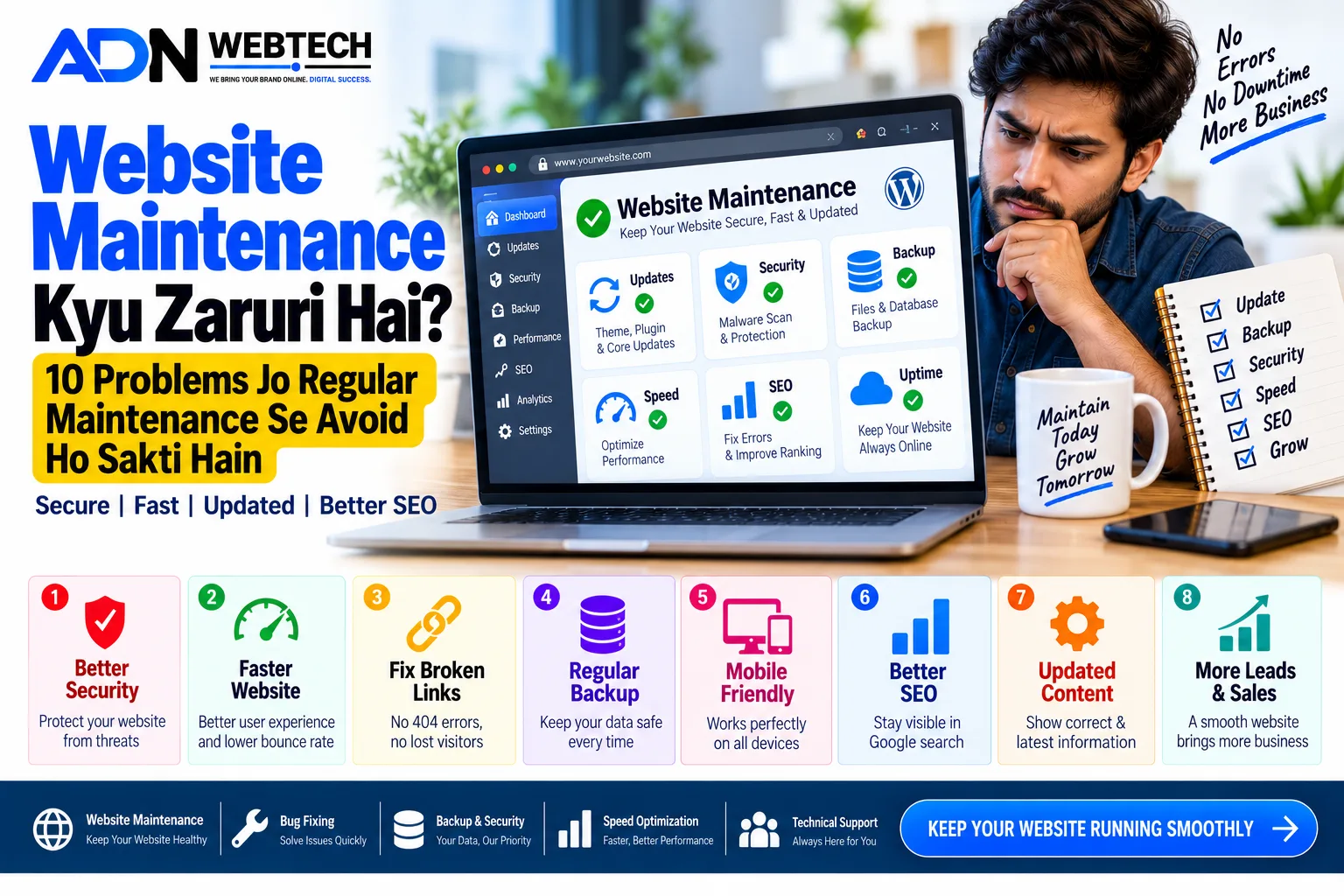
Aaj ke time mein business ke liye website banana ek important step hai, lekin sirf website bana kar usse online chhod dena enough nahi hai.
Website bhi ek digital asset hai jise regularly update, monitor, secure aur optimize karna padta hai.
Agar website ki proper maintenance nahi ki jaati, to kuch time baad website slow ho sakti hai, security vulnerabilities aa sakti hain, pages properly open nahi ho sakte aur Google search performance par bhi negative impact pad sakta hai.
Especially agar aapki website se customer leads, enquiries, online orders ya business revenue generate hota hai, to regular maintenance aur bhi important ho jaati hai.
Is article mein hum samjhenge ki website maintenance kya hoti hai, iski zarurat kyu hoti hai aur website owner ko kaun-kaun se tasks regularly karne chahiye.
Website Maintenance Kya Hoti Hai?
Website maintenance ka simple meaning hai website ko regularly check, update aur improve karna.
Isme sirf content update karna hi include nahi hota. Website maintenance ke andar multiple technical aur security-related activities hoti hain, jaise:
- Website backup
- Software updates
- Plugin/theme updates
- Security monitoring
- Broken link checking
- Website speed optimization
- Database optimization
- SSL monitoring
- Contact forms testing
- Content updates
- SEO monitoring
- Mobile responsiveness checking
- Server/hosting monitoring
- Error fixing
Regular maintenance ka main purpose hota hai website ko secure, fast, functional aur updated rakhna.
1. Website Security Ke Liye Maintenance Zaruri Hai
Website maintenance ka sabse important part security hai.
Agar website ka CMS, plugin, theme ya custom code outdated hai, to security vulnerabilities create ho sakti hain.
Regular maintenance mein security updates, login protection, malware monitoring, backups aur suspicious activity checking jaise tasks include kiye ja sakte hain.
Business website ke liye security ko ignore karna expensive problem create kar sakta hai.
2. Website Slow Hone Se Bachti Hai
Time ke saath website mein unnecessary files, large images, old database records, unused plugins aur extra scripts accumulate ho sakte hain.
Iski wajah se website ki loading speed affect ho sakti hai.
Regular maintenance mein:
- Image optimization
- Cache optimization
- Database cleanup
- Unused files removal
- CSS/JS optimization
- Server configuration checking
jaise tasks kiye ja sakte hain.
Fast website se visitors ko better browsing experience milta hai aur website ke overall performance ko maintain karna easier hota hai.
3. Broken Links Aur 404 Errors Fix Kiye Ja Sakte Hain
Website par kabhi-kabhi pages delete ya rename ho jaate hain.
Agar kisi purane page ka link kisi aur page, blog ya external website par laga hua hai, to visitor ko 404 Not Found error mil sakta hai.
Regular maintenance ke through broken links identify karke:
- Link update
- Redirect setup
- Deleted page recovery
- Incorrect URLs correction
ki ja sakti hai.
4. Website Backup Bahut Important Hai
Website ka backup ek safety copy ki tarah hota hai.
Agar server failure, accidental deletion, hacking ya coding error ki wajah se website mein problem aa jaaye, to backup se website ko restore karna possible ho sakta hai.
A good maintenance process mein generally:
Files + Database + Important Configuration
ka backup consider kiya jaata hai.
Sirf backup banana enough nahi hai. Kabhi-kabhi backup ko restore karke verify karna bhi useful hota hai.
5. WordPress Website Ko Regular Updates Ki Zarurat Hoti Hai
Agar aap WordPress website use kar rahe hain, to WordPress core, plugins aur themes regularly update hote rehte hain.
Lekin updates ko blindly install karna bhi sahi approach nahi hai.
Professional maintenance process mein update se pehle backup aur important changes ke baad website testing ki ja sakti hai.
Particularly e-commerce website mein updates ke baad:
- Login
- Product pages
- Cart
- Checkout
- Payment gateway
- Contact forms
- Order system
ko test karna important hota hai.
6. Website Content Updated Rehna Chahiye
Aapki website par agar purani information available hai, to visitor ko business inactive ya outdated lag sakta hai.
For example:
- Old phone number
- Old address
- Discontinued services
- Outdated pricing
- Old offers
- Previous year's information
- Broken social media links
In information ko periodically review karna chahiye.
Fresh aur accurate content visitors ke liye website ko more useful banata hai.
7. Contact Forms Aur Enquiry System Check Karein
Business website ka main purpose aksar leads generate karna hota hai.
Imagine kijiye visitor ne contact form fill kiya, lekin email notification hi nahi aa rahi.
Aapko pata bhi nahi chalega ki potential customer ne enquiry bheji hai.
Isliye maintenance ke during contact forms, email notifications, WhatsApp buttons, enquiry systems aur other lead-generation features ko test karna useful hai.
8. Mobile Version Ko Regularly Check Karein
Aaj ke users different screen sizes aur devices se website access karte hain.
Website desktop par perfect ho sakti hai, lekin mobile par:
- Text bahut small
- Buttons overlap
- Images cut
- Menu properly open na hona
- Horizontal scrolling
- Form difficult hona
jaise problems ho sakti hain.
Isliye website maintenance mein mobile responsiveness ko bhi check karna chahiye.
9. SEO Problems Ko Identify Karna Easy Hota Hai
Website maintenance ka SEO se bhi connection hai.
Regular monitoring se aap identify kar sakte hain:
- Broken pages
- Indexing problems
- Missing titles
- Missing meta descriptions
- Duplicate pages
- Redirect issues
- Sitemap problems
- Technical errors
SEO ek one-time task nahi hai. Website structure, content aur search environment time ke saath change hote rehte hain.
Isliye periodic SEO checks useful hote hain.
10. Business Website Ko Professional Aur Reliable Banaye Rakhta Hai
Website aapke business ki online identity hoti hai.
Agar visitor ko:
- Broken pages
- Old information
- Slow loading
- Security warning
- Poor mobile design
- Non-working forms
milte hain, to overall user experience affect ho sakta hai.
Regular maintenance website ko reliable aur professionally managed rakhne mein help karti hai.
Website Maintenance Mein Kaun-Kaun Se Tasks Hone Chahiye?
Ek basic website maintenance checklist kuch is tarah ho sakti hai:
Daily / Frequent Monitoring
- Website availability
- Server errors
- Security alerts
- Important enquiry systems
Weekly Checks
- Backup verification
- Broken links
- Forms testing
- Website speed
- Security monitoring
Monthly Maintenance
- Software updates
- Plugin/theme updates
- Database optimization
- Content review
- SEO checks
- Analytics review
- Mobile testing
Periodic Maintenance
- Full security audit
- Website redesign review
- Hosting performance review
- Technical SEO audit
- Conversion optimization
- Old content update
Actual frequency website ke type, traffic, technology aur business requirements par depend karti hai.
Website Maintenance Ignore Karne Se Kya Ho Sakta Hai?
Agar website ko long time tak maintain nahi kiya jaata, to multiple problems develop ho sakti hain.
For example:
- Website slow ho sakti hai
- Security vulnerabilities increase ho sakti hain
- Website features kaam karna band kar sakte hain
- Contact forms fail ho sakte hain
- Broken links increase ho sakte hain
- Outdated information show ho sakti hai
- SEO problems develop ho sakti hain
- Backup available na hone par recovery difficult ho sakti hai
In problems ko baad mein fix karna regular maintenance ke comparison mein zyada difficult aur costly ho sakta hai.
Website Maintenance Aur Website Redesign Mein Difference
Website maintenance aur website redesign same cheez nahi hain.
Maintenance ka purpose existing website ko properly working condition mein maintain karna hota hai.
Redesign ka purpose website ke design, structure, user experience aur functionality ko significantly improve karna hota hai.
For example:
Maintenance:
- Plugin updates
- Backup
- Security checks
- Broken links fix
- Content updates
- Speed optimization
Redesign:
- New UI/UX
- New layout
- New branding
- New navigation
- New functionality
- Complete visual improvement
Agar website technically aur visually outdated ho chuki hai, to sirf maintenance ke bajay redesign ki requirement bhi ho sakti hai.
Kya Har Website Ko Maintenance Ki Zarurat Hoti Hai?
Haan, almost har website ko kisi na kisi level par maintenance ki zarurat hoti hai.
Lekin maintenance ka level website ke according change hota hai.
Simple portfolio website ki maintenance requirements relatively limited ho sakti hain.
Lekin e-commerce website, business portal, membership website, booking website ya custom web application ko regular technical monitoring ki zyada zarurat ho sakti hai.
Jitni complex website hogi, utni hi important systematic maintenance hogi.
Professional Website Maintenance Service Mein Kya Include Hona Chahiye?
Agar aap kisi developer ya agency se website maintenance service le rahe hain, to pehle clearly check karein ki service mein kya included hai.
For example:
- Website backup
- Security monitoring
- Updates
- Bug fixing
- Speed optimization
- Broken link checking
- Database maintenance
- Content updates
- Technical SEO checks
- Uptime monitoring
- Emergency support
Har agency ki maintenance package alag ho sakti hai, isliye service lene se pehle scope clearly understand karna important hai.
Website Maintenance Ke Liye Simple Checklist
Aap apni website ke liye ye basic checklist follow kar sakte hain:
✓ Regular backup rakhein
✓ Website software updated rakhein
✓ Security monitoring karein
✓ Broken links check karein
✓ Website speed monitor karein
✓ Contact forms test karein
✓ Mobile version check karein
✓ Important content update karein
✓ SSL certificate monitor karein
✓ SEO errors check karein
✓ Database optimize karein
✓ Website uptime monitor karein
✓ Important changes se pehle backup lein
Website banana business ki online journey ka sirf first step hai.
Uske baad website ko regularly maintain karna bhi equally important hai.
Regular website maintenance se aap security problems, technical errors, broken links, slow performance aur outdated information jaise issues ko identify karke timely fix kar sakte hain.
Agar aapki website business ke liye important hai aur usse regular enquiries, customers ya sales milti hain, to website maintenance ko monthly business activity ki tarah treat karna chahiye.
A professional website sirf achhi dikhni nahi chahiye — use secure, fast, functional aur updated bhi rehna chahiye.
Agar aapko website development, WordPress, website maintenance, SEO, speed optimization ya digital solutions ki requirement hai, to ADN WEBTECH se professional web development aur digital services ke baare mein jaan sakte hain.